
Technisette's Tips & Tricks - #001
#001 - March 2026

Welcome to the very first ‘Technisette’s Tips & Tricks’!
In this newsletter, you’ll find some helpful tips and tricks for your OSINT investigations. The insights shared here are based on my personal experiences over the last month.
Have fun reading!
OSINT General
Add-ons - Which addons to use?
Last year, there was a pretty good article by I-Intelligence about some recommendations for good add-ons to use (can be read here). If you are relatively new to the OSINT world, this is quite a good list to start with!
But I also wanted to give you some advice. Add-ons are a great way of enhancing your research or even speeding things up, but they can also make you see less clearly, and you might draw the wrong conclusions. Websites can detect whether you’re using add-ons in your browser and might let you see a different version of the website based on those add-ons. Therefore, I recommend you also have a ‘virgin browser’. This is a browser where no add-ons are installed. So, if you are investigating a certain website that is crucial for your investigation, always check how the website looks when you have add-ons installed and when you have none. Just to be sure you’re not missing out on something interesting😉!
Maps - Free Satellite Imagery
Benjamin Strick posted a great video on his YouTube channel, showing 6 free satellite imagery tools (view the video here).
I love playing with the option to go back in time using Google Earth, but sometimes they just don’t show the best quality of the satellite imagery.
Thanks to Benjamin, I have a new favourite; https://livingatlas.arcgis.com/wayback
Just select the area of choice on the map, and on the left-hand side, dates will appear for you to select to go back in time.
General - Prepare your OSINT Investigation!
It’s easy to get lost on the internet; there are just so many interesting rabbit holes you can dive into! Especially when starting your OSINT research without a proper scope or question you want to answer, it’s really important to think about your scope/question when you start your investigation. ShadowDragon has set up a helpful checklist to help you prepare.
If you want to work efficiently and save time, make sure to always prepare!
Social media
Instagram - Avatar Pictures within the Mobile App
Recently, I discovered that when looking at a profile in the mobile app, the profile picture would suddenly change quite quickly to an avatar-like image. Within a second, it would then change back to the normal profile picture again. This was something I had not seen before, so it immediately got my attention.
While investigating, it seems that profiles on Instagram that have also set a META Avatar, have a double profile picture. If you are investigating a profile on the Instagram mobile app, definitely give the profile picture a little swipe from right to left (1) to see if the profile also has an avatar (2).
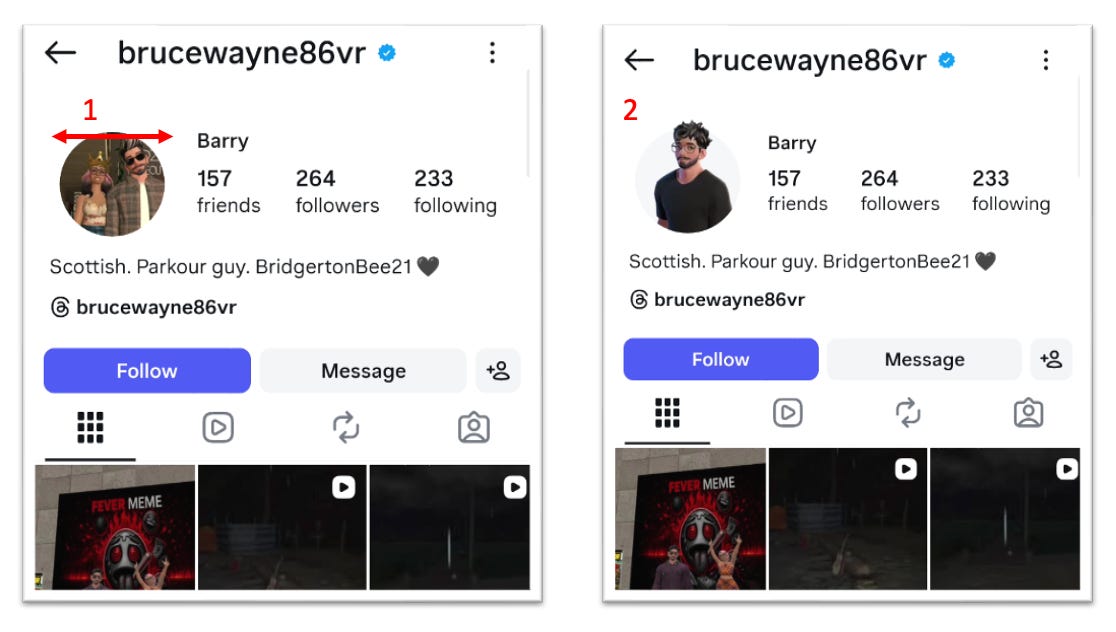
You don’t have to be friends with a profile in order to view this; you just need to have a profile that’s public.
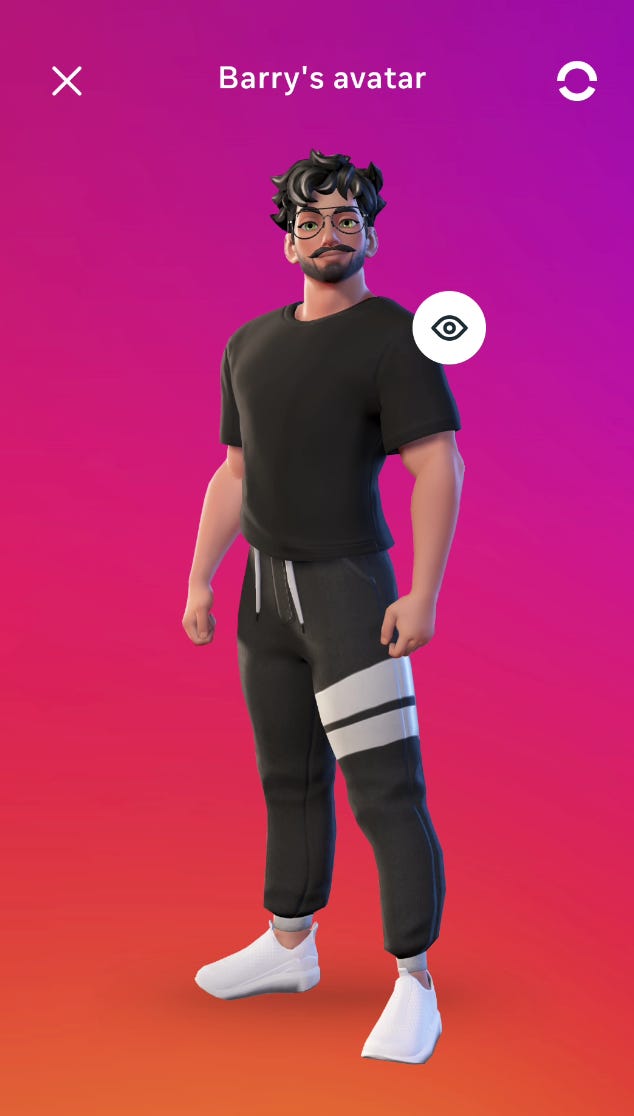
Once you click on the avatar, you can see the enlarged version of it.
Instagram - Threads in Bio…?
In order to have an account on Threads, you needed to have an Instagram account (not anymore, by the way). For a long time, you could tell if someone was active on Threads because it would show on their Instagram bio.
I don’t know when exactly, but there is now a privacy setting where you can choose not to show your Threads account in your Instagram bio. Therefore, it’s important to always check if an Instagram account might be on Threads by just pasting their username behind ‘threads.com/.’. Especially private Instagram profiles often have a public Threads account. And although they might not be very active, you never know what you might be able to find! 😉
Snapchat - Snapmap
Snapmap used to be available on your desktop by simply navigating to snapmap.com. Unfortunately, it has been gone for a while. Although… If you want to know what’s going on in a location on Snapchat, you can use the search bar on their website to search for a location to see what has been posted.
Go to snapchat.com and use their search bar in the top left (1) and then select ‘Places’ (2).
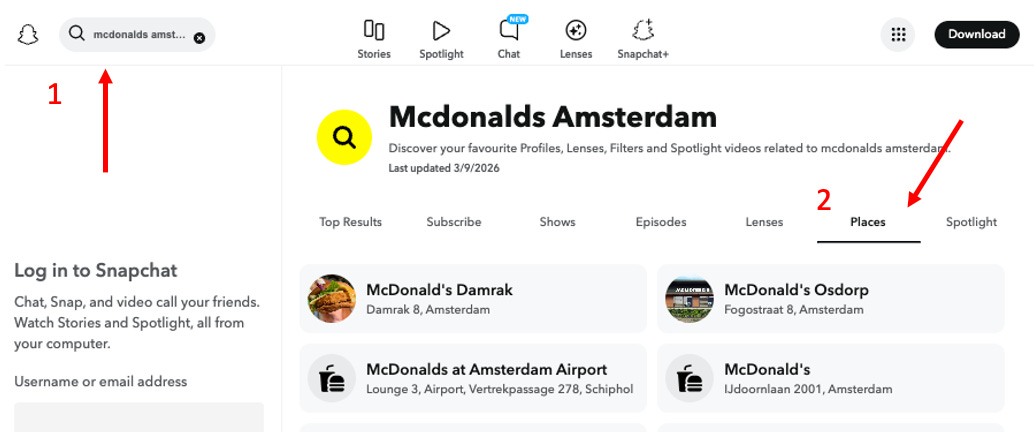
There will always be a limited amount of 10 locations showing. Is your location not in there? Then try to be more specific. Now, once you’ve selected the location of your choice, you can now see the most recent Snap Stories that have been shared and tagged to that location.
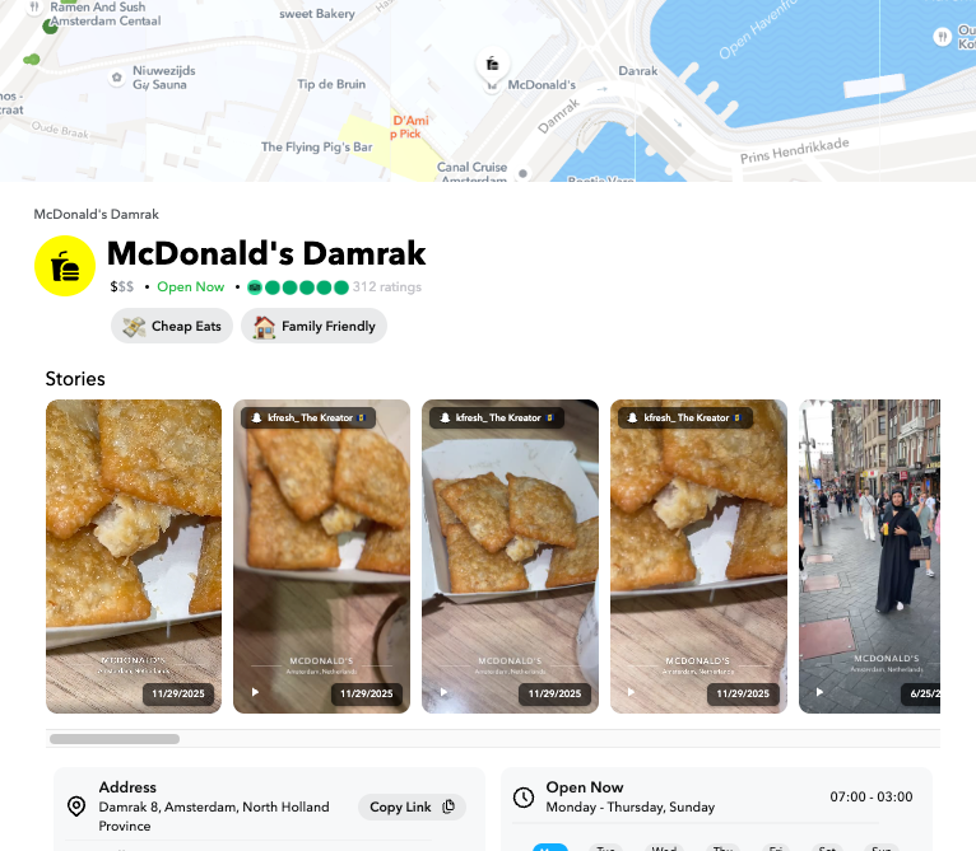
Some of them even have the username of the profile who shared the Story!
Although this might not be completely the same as Snapmap, it does give you the opportunity to search Snapchat’s location-tagged Stories without being logged on to the platform.
If you are keen to learn more about Snapchat, I’m working on a brand new My OSINT Training course on Snapchat, which will be launched soon! It will include techniques on how to investigate both mobile and browser versions of Snapchat, and I’ll show you how to capture data safely.
Tips to Watch/Do/Read
Do - Train your skills
Practicing your skills is so important! Maybe in your daily research, you spend most of your time on social media. And although you know how to find things in archives, this might not be something you do every day. So, getting outside of that comfort zone can be helpful to sharpen your skills!
I personally love to practice my skills on various websites that offer these challenges or CTFs. One of my personal favorites is made by Gralhix (click here).
There are 3 levels to be played: easy, medium, hard, so there is something for everyone! And if you’re not keen to play, read (or watch) the walkthroughs others have made to learn how others approach the task!
Watch - BBC’s The Darkest Web
I have so much respect for the people who investigate the darkest parts of the internet to save children. It’s a job I think most of us wouldn’t be able to do, mostly because of the mental load that comes with that.
In this BBC documentary, the BBC follows an American-based team that works with international partners to find predators and abusers and bring them to justice. Using OSINT techniques and a lot of patience, they succeed. If you’ve had that rush of succeeding in an OSINT investigation, you’ll relive that moment when seeing it in this documentary.
But what this documentary also shows is that the mental load of doing online investigations can be hard. It’s important to keep a close eye on yourself, but also on your colleagues and get the right help when needed. Here are some tips Nico Dekens shared last year.
See You Next Month!
I hope you enjoyed this first newsletter.
If you have any tips, tricks, or recommendations, feel free to reach out to me!
And if you’d like to receive my newsletter monthly, click on the ‘Subscribe now’ button below.