
Technisette's Tips & Tricks - #003

And here is number 3!
I gathered some pretty nice OSINT tips and tricks last month, so I hope there is something in here for you that helps you with your investigations!
Have fun reading!
Warning
In my last newsletter I mentioned the Chrome add‑on Instant Data Scraper. Although a useful tool, it recently changed owners, and the new owners may be monitoring your internet behaviour even when you’re not using the extension.
I recommend uninstalling Instant Data Scraper if you haven’t already.
More about this warning is in Micah Hoffman’s LinkedIn post.
I’ve also updated my previous post.
Sorry for any inconvenience.
OSINT General
Google - Advanced search changed
Google’s advanced search operators don’t all work the way they used to. I used to rely on the inurl: operator, but it no longer does the trick — results are mixed with pages that don’t actually contain the string I’m looking for in the URL. It appears inurl: has been partially merged with site:, so searching for Instagram posts with inurl:instagram.com/p no longer returns useful results.
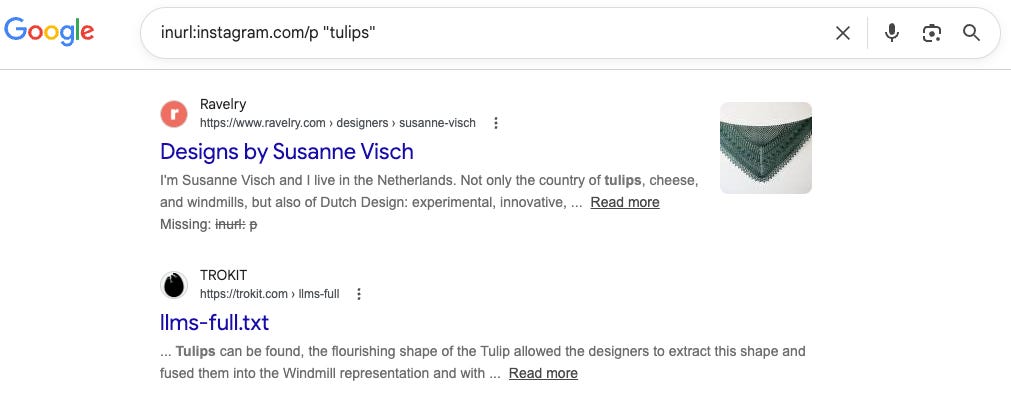
The recent change may coincide with an update to the google.com/advanced_search page.
Before May 7, the page offered many more options (see the Wayback Machine capture); most of those options are now gone.
If anyone knows why or can explain this change, I’d love to hear from you!
Social media
Facebook - Find out about the activity of a profile!
Facebook isn’t my primary source of information anymore, but I know it still is for many of you. Apparently this feature has been available for a few months, though we only discovered it recently: when you click a profile’s display name (you must be logged in to see it), you now get extra information!
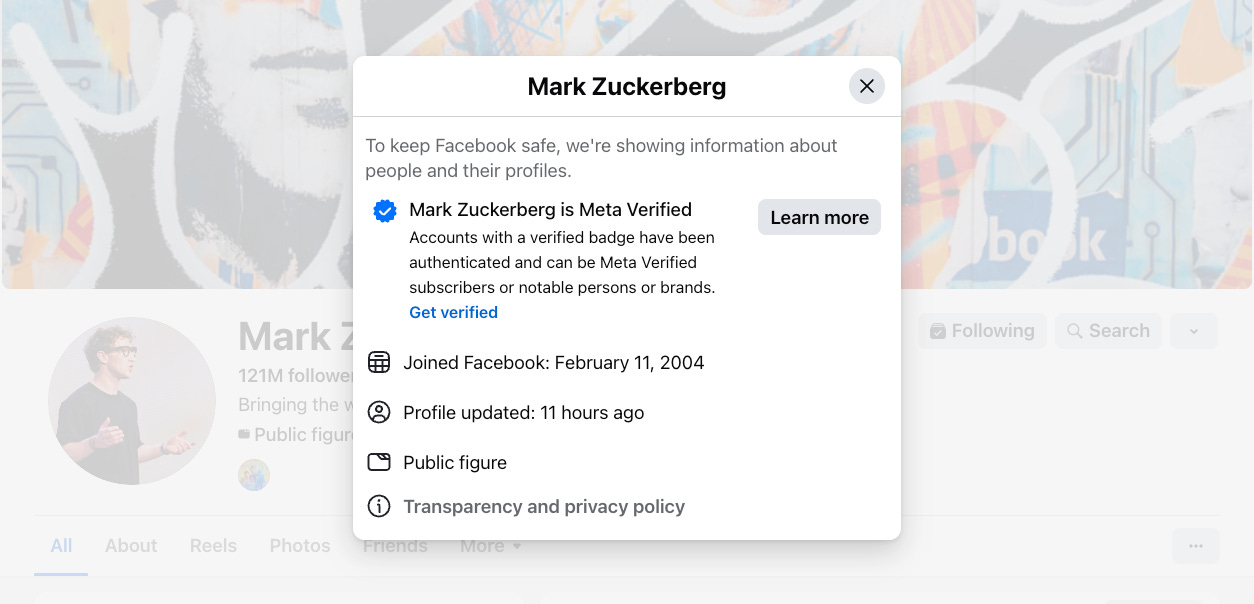
You can now see a profile’s exact join date and a timestamp of their last activity. No more guessing last activity or using the Facebook Marketplace trick (facebook.com/marketplace/profile/InsertIDhere — replace InsertIDhere with the target’s ID) to find the join year; just click the display name.
Time to update my Facebook course on My OSINT Training!
Instagram - Whats is currently popular on Instagram?
Instagram is pushing video content a lot. Like the Stories and Reels.
Recently I discovered a new page on Instagram; instagram.com/popular

This page shows a selection of verified profiles that are popular and a lot of video content, such as Reels. When you select a category (for example, “Cute Animals”), the URL changes — which means the page can be indexed by search engines like Google.
If you’re searching for Reels about a specific topic, try this Google search and replace “amsterdam” with your topic of choice:

Snapchat - Learn what you need to know about Snapchat!
Snapchat is a popular platform that investigators don’t always fully understand. That’s why I created a complete Snapchat course on My OSINT Training.
I’ll show you how to search the platform, how to view content, and how to view content without notifying your target — because Snapchat, unlike most other social platforms, notifies users when you view content or take screenshots.
It’s important to work safely!
Telegram - When did an admin join a channel?
When investigating Telegram channels, it’s useful to identify who holds the most important role — channels often have multiple admins, and finding the “big boss” is relevant.
Open Telegram on desktop (download required and can be found here), then open the target channel so you can read the chat.
At the top of the chat click the channel name (which shows the member count) to open the channel info (a pop up will open).
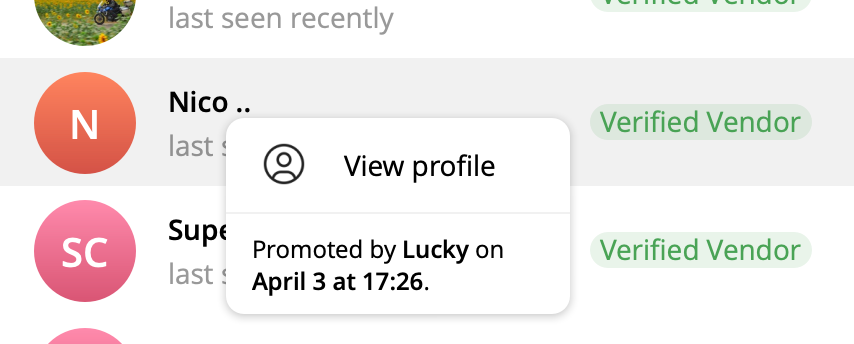
Scroll down to the list of admins, then right‑click an admin to see when they were made an admin and who promoted them.
Tips to Watch/Do/Read
Geolocation - Learn from others
I love doing geolocations and I love watching others do them even more. Because there are so many ways to solve a geolocation puzzle, it’s always interesting to see different approaches.
One of my favourites is @the_josemonkey on TikTok. He explains how he finds people using tiny pieces of video footage they share.

I found a new favourite: @guessnotlost (on TikTok and other platforms). His videos aren’t always about footage because he often finds people from, for example, a private Instagram profile. The techniques he uses and the signs he looks for are a refreshing contrast to compare with your own methodology.
OSINT Challenge - Keep yourself challenged!
OSINT covers a wide range of skills and you might focus mainly on social media or spend most of your time on geolocation, so it’s useful to practice areas you’re less familiar with. OSINT challenges are a great way to gain that experience.
Bellingcat offers excellent challenges you can try.
And NO, a reverse image search won’t always solve them; using one may lead you to write-ups from others who’ve already completed the challenge and you might see some spoilers!
See You Next Month!
I hope you enjoyed reading this newsletter! Check out previous newsletters here.
If you have any tips, tricks, or recommendations, feel free to reach out to me!
Thanks for reading Technisette’s Substack! This post is public so feel free to share it.
And if you’d like to receive my newsletter monthly, click on the ‘Subscribe now’ button below!